Choosing between an on-premises SFTP server and a cloud-based solution is a decision that affects your budget, security posture, and operational workload. Both approaches have legitimate strengths, and the right choice depends on your organization's specific requirements.
Defining On-Premises SFTP
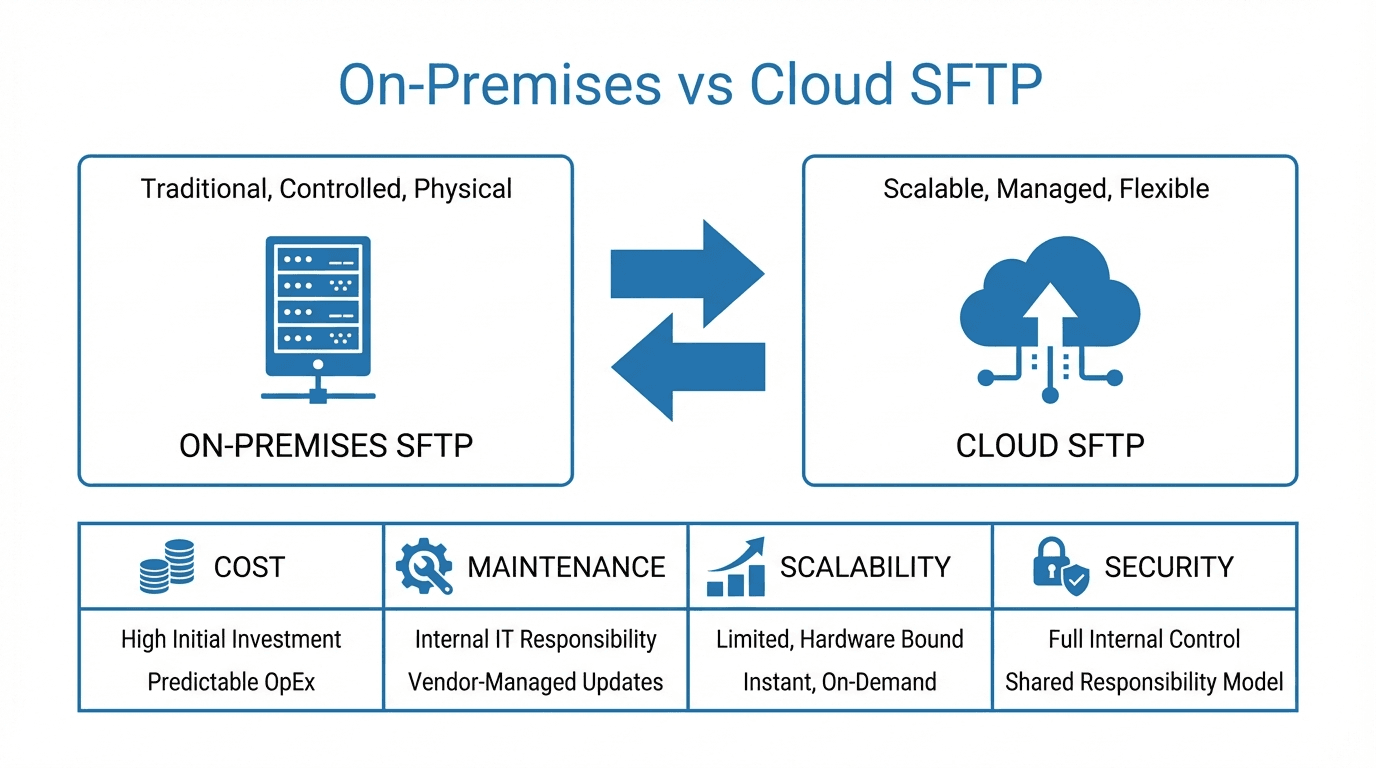
An on-premises SFTP server runs on hardware that your organization owns and manages. You are responsible for the physical server, the operating system, SSH configuration, storage, backups, networking, and security patches. The server typically sits in your data center or a colocation facility.
Defining Cloud SFTP
A cloud SFTP solution is hosted and managed by a third-party provider. The provider handles server infrastructure, software updates, storage, availability, and often security features like IP allowlists and audit logging. You interact with the service through a web interface or API to manage users, keys, and file access.
Comparing Total Cost of Ownership
On-premises SFTP has significant upfront and ongoing costs:
- Hardware: Servers, storage arrays, and networking equipment.
- Software licensing: Operating system, SSH server software, and monitoring tools.
- Personnel: System administrators to install, configure, patch, and troubleshoot.
- Facilities: Power, cooling, and physical security in a data center.
Cloud SFTP typically operates on a subscription model with predictable monthly costs. There is no hardware to purchase, and the provider absorbs the cost of infrastructure management. For many organizations, the total cost of cloud SFTP is lower once you factor in the fully loaded cost of running on-premises infrastructure.
Security Considerations
On-premises gives you full control over your security stack. You choose the firewall rules, SSH configuration, encryption algorithms, and physical access controls. However, this control also means the burden of keeping everything updated and correctly configured falls on your team.
Cloud SFTP shifts much of the security responsibility to the provider. A good provider implements security best practices by default, including automatic patching, encrypted storage, and DDoS mitigation. The shared responsibility model means you still manage user access and credentials, but the provider handles infrastructure-level security.
Compliance Implications
Some compliance frameworks or industry regulations specify where data can be stored or require that certain controls be in place. On-premises SFTP gives you direct control over data residency and physical security. Cloud SFTP can also meet these requirements, but you need to verify that the provider supports your required regions and holds relevant certifications such as SOC 2 or ISO 27001.
Scalability
Scaling an on-premises SFTP server means purchasing additional hardware, provisioning storage, and potentially redesigning your network. This process can take weeks or months.
Cloud SFTP scales on demand. Adding storage, handling more concurrent connections, or expanding to new regions can typically be done in minutes through the provider's interface.
Maintenance Burden
On-premises infrastructure requires ongoing attention: OS patches, SSH updates, disk monitoring, backup verification, and failover testing. Each of these tasks requires skilled personnel and carries risk if neglected.
With cloud SFTP, the provider handles maintenance and updates. Your team can focus on managing users and workflows rather than keeping servers running.
Hybrid Approaches
Some organizations use a hybrid model, running an on-premises SFTP server for internal or highly sensitive workflows while using cloud SFTP for partner-facing transfers. This can offer the control benefits of on-premises with the convenience of cloud for external collaboration.
A Decision Framework
Consider cloud SFTP if you want to minimize operational overhead, need to scale quickly, or lack dedicated infrastructure staff. Consider on-premises if you have strict data residency requirements, existing data center investments, or regulatory constraints that mandate full infrastructure control.
For many organizations, managed cloud SFTP offers the best balance of security, cost, and simplicity. Try FilePulse to see how a managed SFTP service can simplify your file transfer operations, or contact our team to discuss your requirements.