Google Cloud offers several tools for moving data, including Storage Transfer Service and Cloud Storage's built-in transfer capabilities. These services excel at moving data between cloud environments, but they were not designed for the core use case of managed file transfer: securely exchanging files with external partners over standard protocols like SFTP.
This guide compares Google Cloud Storage Transfer Service with managed SFTP solutions like FilePulse, helping you understand when each approach makes sense.
What Google Cloud Storage Transfer Service Does
Google Cloud Storage Transfer Service is designed to move large volumes of data into Google Cloud Storage (GCS). It supports transfers from:
- Amazon S3 buckets
- Azure Blob Storage containers
- HTTP/HTTPS sources
- Other GCS buckets
- On-premises storage via Transfer Service for on-premises data
The service is optimized for bulk data migration and scheduled data synchronization between cloud storage systems. It handles retry logic, bandwidth management, and transfer logging automatically.
What Managed SFTP Does
A managed SFTP solution like FilePulse provides secure file transfer endpoints that external partners can connect to using standard SFTP clients. It handles:
- SFTP server infrastructure and availability
- Partner account management and onboarding
- SSH key and credential management
- File routing to cloud storage backends
- Audit logging for compliance
- Automation and notification workflows
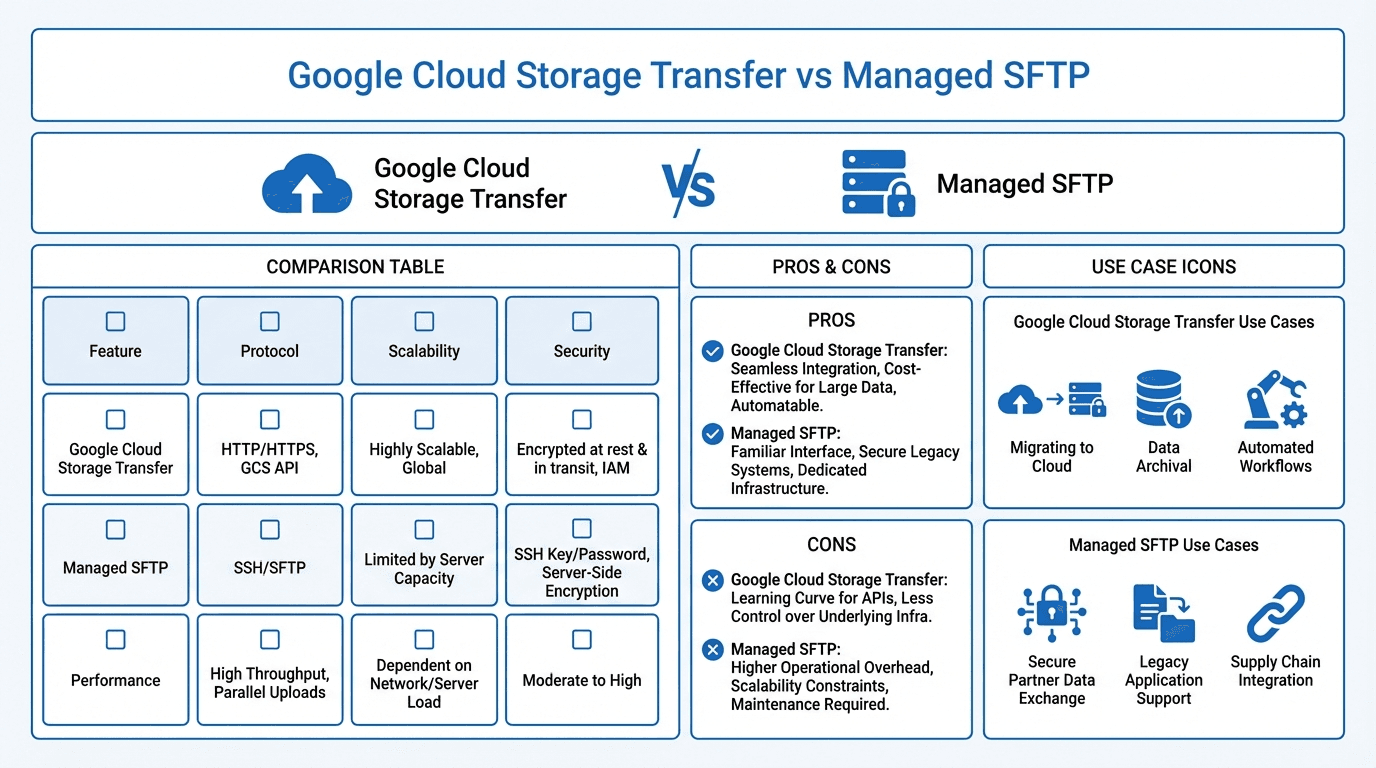
The key difference is the audience. Storage Transfer Service moves data between systems you control. Managed SFTP facilitates file exchange with people and organizations outside your infrastructure.
Feature Comparison
| Feature | GCS Storage Transfer | FilePulse (Managed SFTP) | |---|---|---| | Primary use case | Cloud-to-cloud data migration | Partner file exchange | | SFTP support | No | Yes (native) | | External partner access | No | Yes (built-in onboarding) | | Source/destination | Cloud storage services | SFTP endpoints + multi-cloud storage | | Authentication | Google IAM, service accounts | SSH keys, passwords, RBAC | | Scheduling | Cron-like schedules | Event-driven + scheduled | | Audit logging | Transfer logs in GCP | Detailed per-file audit trail | | Partner management | Not applicable | Built-in dashboard | | Setup complexity | Moderate (GCP knowledge required) | Low (purpose-built interface) |
Cost Comparison
Google Cloud Storage Transfer Service itself is free for cloud-to-cloud transfers. However, you pay for:
- GCS storage costs for the destination bucket
- Network egress fees for data leaving other cloud providers
- Operations costs for API calls against GCS
For managed SFTP, you need to factor in the cost of the SFTP platform itself. If you try to build SFTP on GCP using Compute Engine VMs:
- VM costs for running SFTP server instances
- Persistent disk costs for staging storage
- Load balancer costs if you need high availability
- Engineering time for setup, maintenance, and monitoring
- GCS costs for final storage
FilePulse's subscription pricing bundles all of this into a predictable monthly fee. There are no per-transfer charges, no infrastructure to manage, and no engineering time spent maintaining SFTP servers.
Partner File Exchange
This is where the two solutions diverge most sharply.
Google Cloud Storage Transfer Service has no concept of external partners. It moves data between storage systems using service account credentials. If a partner needs to send you files, they cannot connect directly to Storage Transfer Service. You would need to set up a separate SFTP server, provide partners with access, and then use Storage Transfer Service (or another mechanism) to move files from the SFTP staging area into GCS.
FilePulse is built specifically for partner file exchange. Partners connect to their dedicated SFTP endpoint, upload files, and FilePulse routes those files to your configured storage backend (including GCS). The entire workflow, from partner connection to final storage, is handled by a single platform.
Setup Complexity
Setting up Storage Transfer Service requires familiarity with the GCP console, IAM roles, service accounts, and storage bucket configuration. For simple cloud-to-cloud transfers, the setup is reasonable. For more complex scenarios involving on-premises data, the agent-based transfer approach adds significant complexity.
Setting up managed SFTP on GCP from scratch is substantially more complex. You need to provision VMs, install and configure SFTP server software, set up firewall rules, configure storage mounting or sync, implement user management, and build monitoring and alerting.
FilePulse abstracts all of this away. You sign up, connect your storage backend, create partner accounts, and start transferring files. The typical setup takes minutes rather than days.
Compliance
Both Google Cloud and FilePulse provide strong security foundations. GCS encrypts data at rest and in transit by default, and GCP offers comprehensive compliance certifications.
The difference is in how compliance controls are exposed for file transfer workflows. With GCP, you need to configure audit logging (Cloud Audit Logs), set up access controls (IAM), and ensure your custom SFTP infrastructure meets compliance requirements. This is achievable but requires deliberate effort.
FilePulse provides compliance-ready file transfer out of the box: encrypted connections, detailed audit trails, role-based access, and retention policies are built into the platform.
When to Choose Google Cloud Storage Transfer
Storage Transfer Service is the right choice when:
- You need to migrate large datasets between cloud storage providers
- Your transfers are between systems you control (no external partners)
- You are consolidating data from multiple cloud sources into GCS
- You need scheduled synchronization between cloud storage buckets
When to Choose Managed SFTP
A managed SFTP solution like FilePulse is the right choice when:
- External partners need to send or receive files from your organization
- You need SFTP endpoints that partners can connect to with standard clients
- Partner onboarding and account management are ongoing activities
- Compliance and audit logging for file transfers are priorities
- You want predictable costs without managing SFTP infrastructure
- You work with multiple cloud providers, not just GCP
Using Both Together
For many organizations, the best approach combines both tools. Use Storage Transfer Service for internal data movement and cloud migration tasks. Use FilePulse for all external partner file exchange. FilePulse can route incoming partner files directly to GCS, where Storage Transfer Service or other GCP tools can pick them up for further processing.
Try FilePulse free to see how managed SFTP simplifies partner file exchange, or talk to our team about integrating with your GCP environment.