Microsoft Azure offers several services for moving files: Azure Files, Azure Blob Storage, and Azure Data Factory. Each serves a different purpose, but none of them were designed specifically for managed file transfer (MFT) workflows. If your team regularly exchanges files with external partners over SFTP or needs a turnkey solution for secure file transfers, it is worth understanding how these Azure services stack up against a purpose-built platform like FilePulse.
Azure's File Transfer Options
Azure provides three primary services that organizations use for file transfers:
Azure Files is a fully managed file share service that supports SMB and NFS protocols. It works well for internal workloads where applications need shared file system access. However, it does not natively support SFTP, and exposing file shares to external partners requires additional networking configuration.
Azure Blob Storage added SFTP support in recent years through the Azure Blob Storage SFTP connector. This lets external users connect over SFTP and land files directly in blob containers. While functional, it requires configuring local user accounts, managing SSH keys manually, and dealing with Azure's storage permission model.
Azure Data Factory is an ETL and data integration service. It can orchestrate file movements between systems using pipelines. For teams that need scheduled, rule-based file transfers, Data Factory provides the automation layer. But it is a general-purpose integration tool, not a file transfer platform, and its learning curve reflects that.
FilePulse: Purpose-Built for File Transfer
FilePulse is a managed file transfer platform designed from the ground up for secure file exchange. It provides SFTP endpoints, partner onboarding workflows, storage integrations, audit logging, and automation without requiring you to assemble multiple cloud services.
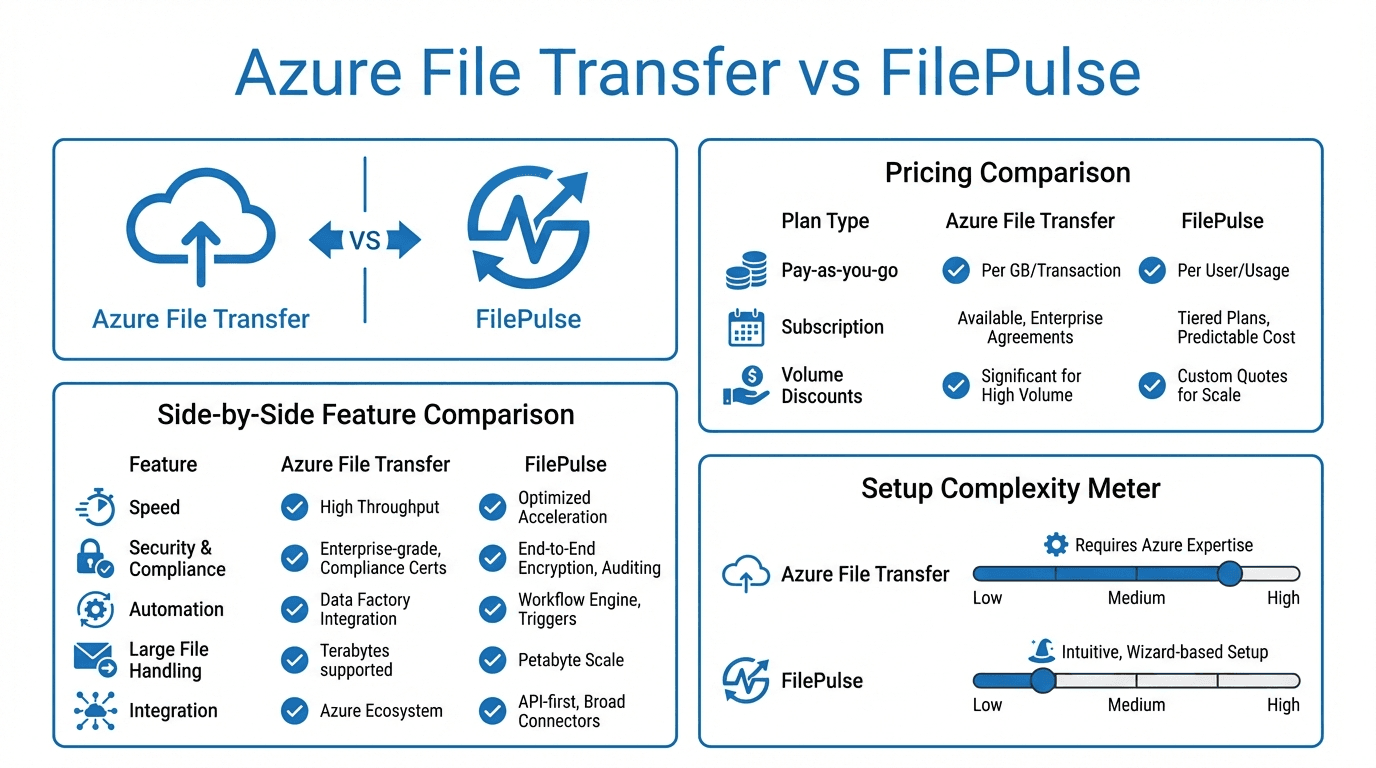
Feature Comparison
Protocol Support
Azure Blob Storage supports SFTP (in preview or GA depending on region), while Azure Files supports SMB and NFS. FilePulse supports SFTP natively with additional options for HTTPS uploads and API-based transfers. If your partners expect to connect over SFTP, FilePulse provides a simpler path.
Partner Onboarding
One of the biggest differences is how you onboard external partners. With Azure, you need to create local user accounts, generate and distribute SSH keys, configure container permissions, and manage access policies. This process involves multiple Azure portal screens and often requires Azure expertise.
FilePulse provides a dedicated partner onboarding workflow. You create a partner, assign them an SFTP endpoint, configure their storage destination, and share credentials. Partners can be up and running in minutes rather than hours.
Cost Analysis
Azure's pricing model for SFTP access through Blob Storage involves multiple cost components: storage costs, transaction costs, SFTP-enabled account premiums, and data transfer fees. These costs can be difficult to predict, especially with variable transfer volumes.
FilePulse uses straightforward per-seat pricing. You know what you are paying each month regardless of how many files are transferred. For teams with predictable partner counts but variable transfer volumes, this model is often more cost-effective.
Here is a simplified comparison:
| Cost Factor | Azure Blob + SFTP | FilePulse | |---|---|---| | Base cost | Storage + SFTP premium | Monthly subscription | | Per-transaction fees | Yes | No | | Data transfer (egress) | Yes | Included | | Partner management | Manual (engineering time) | Built-in | | Predictability | Variable | Fixed |
Security
Both platforms offer strong security fundamentals. Azure provides encryption at rest and in transit, Azure Active Directory integration, and network security groups. FilePulse provides encryption at rest and in transit, SSH key management, IP allowlisting, and role-based access controls.
The key difference is accessibility. Azure's security features are powerful but require expertise to configure correctly. FilePulse surfaces these controls in a straightforward dashboard that does not require cloud infrastructure knowledge.
Monitoring and Audit Logging
Azure provides logging through Azure Monitor, Log Analytics, and Storage Analytics. Setting up comprehensive audit trails for file transfers requires configuring diagnostic settings across multiple services.
FilePulse includes built-in audit logging for every file transfer. You can see who transferred what, when, and where, all from a single dashboard. This is particularly valuable for compliance reporting.
When to Choose Azure
Azure's native file transfer capabilities make sense when:
- You are already deeply invested in the Azure ecosystem and your team has Azure expertise
- Your file transfer needs are primarily internal (between Azure services)
- You need tight integration with Azure Active Directory and Azure networking
- You are building custom data pipelines where Data Factory's orchestration capabilities add value
When to Choose FilePulse
FilePulse is the better fit when:
- You regularly exchange files with external partners over SFTP
- You want predictable monthly costs without per-transaction fees
- You need to onboard new partners quickly without engineering involvement
- Compliance and audit logging are priorities
- Your team does not have deep Azure infrastructure expertise
- You want a solution that works across cloud providers, not just Azure
Conclusion
Azure provides the building blocks for file transfers, but assembling them into a complete solution requires significant engineering effort and ongoing maintenance. FilePulse provides a turnkey alternative that handles the entire file transfer workflow, from partner onboarding to audit logging, in a single platform.
Ready to see how FilePulse compares for your use case? Sign up for a free trial or contact our team for a personalized walkthrough.