When you connect to a traditional SFTP server, the directories you see correspond directly to folders on the server's disk. A virtual filesystem breaks that assumption. It presents a directory structure to the SFTP client that may not exist as physical folders on any single machine. Instead, directories and files are mapped dynamically to one or more storage backends behind the scenes.
What Is a Virtual Filesystem?
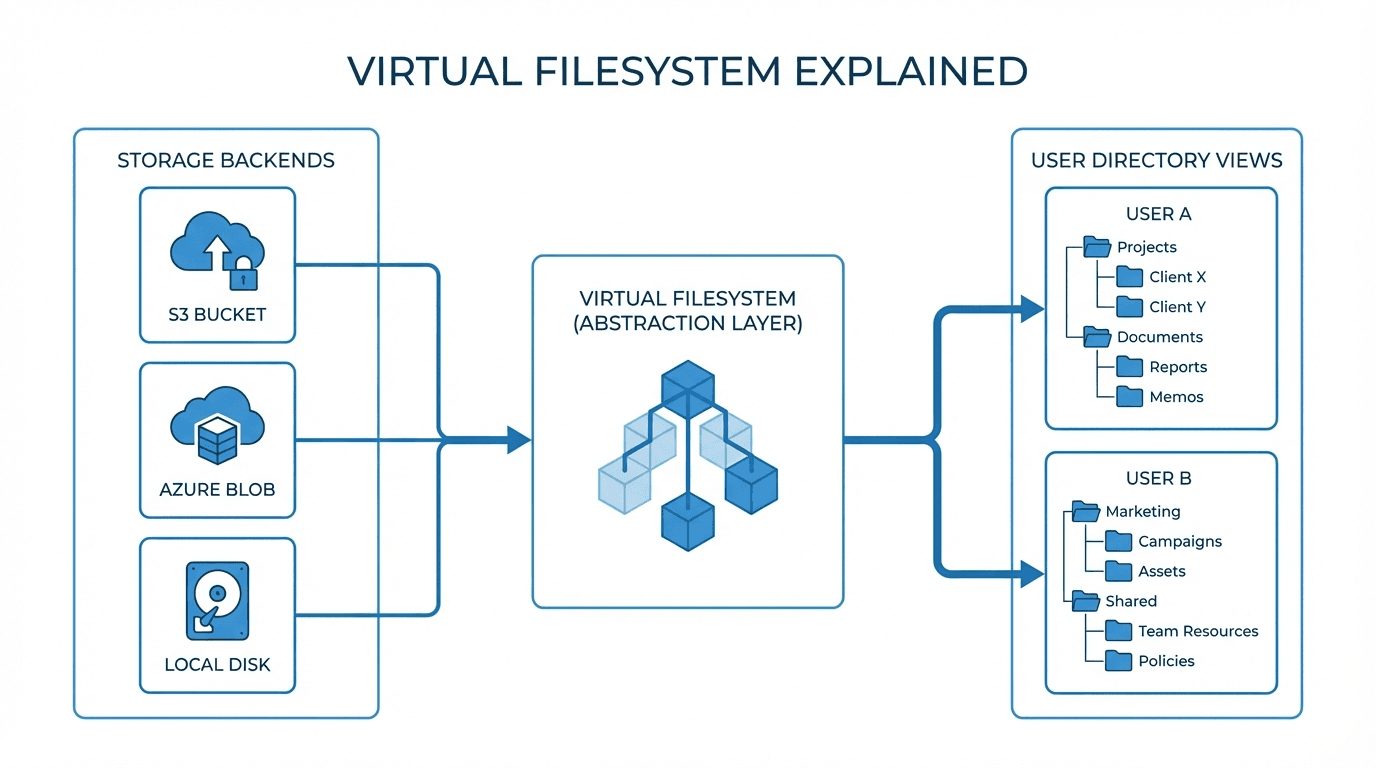
A virtual filesystem is an abstraction layer between the SFTP protocol and the actual storage. It intercepts every file operation (list, read, write, delete, rename) and translates it into the appropriate action on the underlying storage system.
From the client's perspective, everything looks like a normal directory tree. They navigate folders, upload files, and download data using standard SFTP commands. But the files they interact with might live in an S3 bucket, an Azure Blob container, a Google Cloud Storage bucket, or even a combination of all three.
How It Differs from Physical Directories
In a traditional setup:
/home/alice/invoices/maps to a physical folder on disk at that exact path- The server's filesystem permissions control access
- All files live on the same storage device
- Moving files between directories is a local disk operation
With a virtual filesystem:
/home/alice/invoices/might map tos3://acme-corp/alice/invoices//home/bob/reports/might map toaz://partner-data/bob/reports/- Access control is handled by the virtual filesystem layer, not the OS
- Files in different virtual directories can reside on entirely different storage systems
- The SFTP user never sees bucket names, storage URLs, or backend details
Mapping Multiple Storage Backends
One of the most powerful features of virtual filesystems is the ability to map different directories to different storage backends within a single SFTP session.
Consider this example:
/data/
  /inbound/    -> s3://company-bucket/inbound/
  /outbound/   -> s3://company-bucket/outbound/
  /archive/    -> s3://company-glacier/archive/
  /partner-a/  -> az://partner-a-container/shared/
A user connecting to this server sees a clean /data/ directory with four subdirectories. They have no idea that two of them are backed by Amazon S3, one uses S3 with Glacier storage class, and one points to Azure Blob Storage. The virtual filesystem handles all the routing transparently.
Use Cases
Per-User Views
Different users can see entirely different directory structures, even on the same server. An accountant might see /invoices/ and /receipts/, while an engineer sees /builds/ and /artifacts/. Each user's view is tailored to their role, and they cannot access directories outside their mapping.
Multi-Cloud Routing
Organizations that use multiple cloud providers can route files to the appropriate backend based on the directory path. Compliance-sensitive data goes to a storage account in a specific region, while general files go to the most cost-effective option. All of this is invisible to the end user.
Partner Isolation
When onboarding external partners, each partner gets a virtual directory that maps to their own isolated storage location. Partner A cannot see or access Partner B's files, even though both connect to the same SFTP endpoint. This simplifies partner management while maintaining strict data boundaries.
Migration and Hybrid Scenarios
Virtual filesystems make storage migrations smoother. You can gradually move directories from one backend to another by updating the mapping, without requiring clients to change their workflows or connection settings. During a migration from on-premises storage to S3, for example, some directories can point to the old NAS while others point to S3, and clients notice no difference.
How FilePulse Implements Virtual Filesystems
FilePulse uses virtual filesystems as a core feature of its managed SFTP platform:
- Per-user directory mappings are configured in the admin dashboard. Each user account specifies which storage backends and paths are accessible.
- Multiple storage backends can be connected simultaneously. Mix S3, GCS, and Azure Blob across different users or directories.
- Path-based routing ensures that files land in the correct storage location automatically based on the virtual directory they are uploaded to.
- No client-side changes are needed. Partners and clients connect using standard SFTP clients and see a normal directory tree.
- Access controls are enforced at the virtual filesystem layer, providing consistent security regardless of the underlying storage provider.
This approach decouples the SFTP interface from the storage layer, giving you the flexibility to organize, secure, and optimize your file transfer infrastructure without disrupting your users.
Want to see virtual filesystems in action? Start your free trial of FilePulse and map your first storage backends in minutes. Questions about your setup? Talk to our team.